Skip to primary content
Skip to secondary content

Samer 365

Meanderings on Consulting, GenAI, Copilot, Azure & Microsoft 365

Samer 365

Main menu

  • Home

Tag Archives: Inheritance

Configure a site’s Managed Navigation settings

Posted on March 1, 2013 by Samer365
Reply
  1. Go to the site where you would like to use Managed Navigation
    1. NOTE: if you would like to use Navigation inheritance for children sites, then make sure to perform the configuration on the top site which should have this navigation in your Site Collection (most likely your root site in the collection)
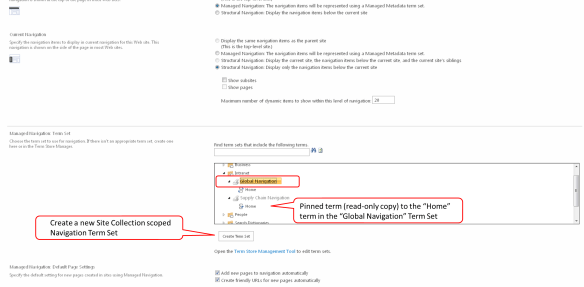
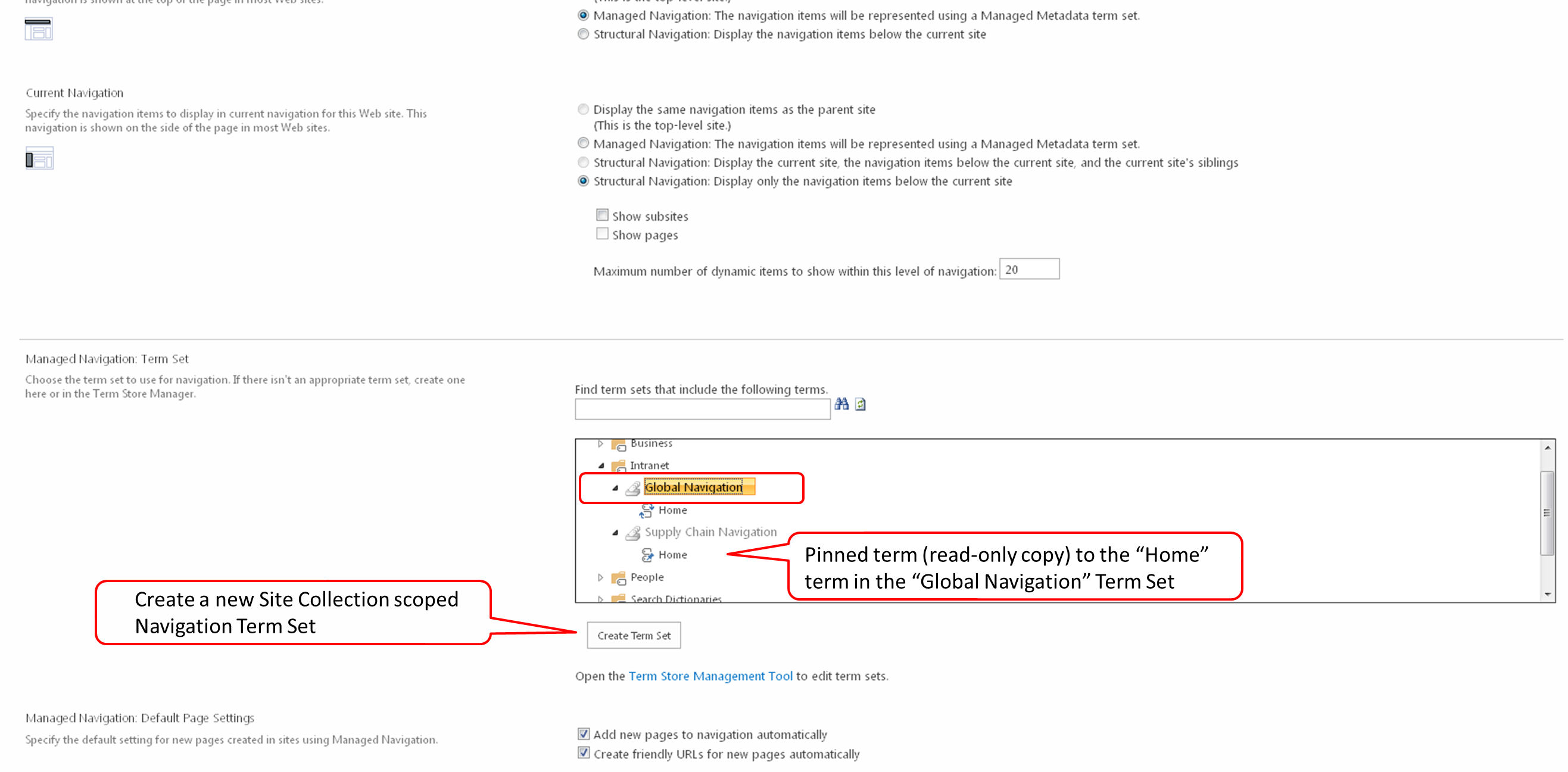
    2. NOTE: a navigation Term Set can only be configured once to a site, if you would like to reuse your Term Set for navigation on another peer site or another Site Collection, or even another Web Application, then you will need to create another Term Set and pin the first level terms (with children) to your existing Term Set.  You can see this in the screen shot below on the Term Set “Supply Chain Navigation”.
  2. Go to the Navigation configuration screen in Site Settings
    1. Click Site Actions > Site Settings
    2. Click Navigation [Look and Feel]
  3. Click on the Managed Navigation option [Global Navigation section]
  4. Expand the Term Groups and select the Term Set that you would like to use for your site’s Navigation [Managed Navigation: Term Set section] or click the “Create Term Set” button to create a new Site Collection scoped Navigation Term SetMetadataDrivenNavigation.Figure4
  5. Then click the OK button
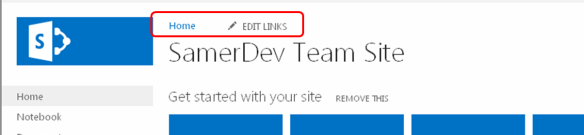
  6. Go to your site and observe the Global NavigationMetadataDrivenNavigation.Figure5
Posted in Managed Metadata, Navigation, SharePoint 2013 | Tagged Drag n Drop, Inheritance, Metadata, Navigation, Tagging, Term Store | Leave a reply

Top Posts & Pages

  • The Evolution of Microsoft Project to Planner Premium
  • Create Multiple Edge Web Apps for each Microsoft Teams Guest Tenant
  • O365 Group created from Teams don't show up in Outlook desktop and online
  • Microsoft Teams / Skype for Business coexistence and interoperability
  • Privileged Access Management (PAM)
  • External Users trying to accept the invitation get an error message "That Didn't Work"
  • QnA Maker
  • Starting Microsoft Teams conversation on items from SharePoint list
  • In order event processing with Azure Functions
  • Microsoft Writing Style Guide Released

Archives

  • November 2024
  • August 2020
  • December 2018
  • November 2018
  • March 2018
  • February 2018
  • January 2018
  • September 2017
  • March 2016
  • February 2015
  • January 2015
  • May 2014
  • February 2014
  • January 2014
  • November 2013
  • October 2013
  • August 2013
  • July 2013
  • June 2013
  • May 2013
  • April 2013
  • March 2013
  • February 2013
  • August 2012
  • May 2012
  • March 2012
  • February 2012

Tags

  • Absolute URLs
  • Administration
  • Authentication
  • BCS
  • callout.js
  • CallOuts
  • CCP
  • CEWP
  • Claims
  • Client Side Rendering (CSR)
  • Community Sites
  • Content Editor Web Part
  • Content Search Web Part
  • Cross-Site Collection Publishing
  • CRUD
  • CSOM
  • CSWP
  • DeltaSuite
  • Document Library
  • Drag n Drop
  • Dropbox
  • Entities
  • ErrorActionPreference
  • External Content Type
  • FAST
  • Fields
  • Guide
  • Guides
  • iCloud
  • Impersonation
  • InfoPath
  • Inheritance
  • Items Matching a Tag
  • JavaScript
  • Lab
  • List Items
  • mailbox
  • Managed Metadata Service
  • Metadata
  • Microsoft
  • models resources
  • Navigation
  • Office 365
  • Outlook
  • Permissions
  • Power BI
  • Preview
  • Product Catalog
  • Relative URLs
  • Reorganization
  • REST
  • Revert To Self
  • runtime errors
  • Search
  • Security
  • Security Trimming
  • service applications
  • SharePoint Designer
  • SharePoint Saturday
  • SharePoint Server Publishing Infrastructure
  • Site Templates
  • SkyDrive
  • software
  • SPS Philly
  • SQL Server
  • SSS
  • Tagging
  • Term Store
  • Training
  • Updates
  • Views
  • Visual Studio & TFS
  • Web Parts
  • Workflows
  • XML

Meta

  • Create account
  • Log in
  • Entries feed
  • Comments feed
  • WordPress.com
Blog at WordPress.com.
  • Subscribe Subscribed
    • Samer 365
    • Already have a WordPress.com account? Log in now.
    • Samer 365
    • Subscribe Subscribed
    • Sign up
    • Log in
    • Report this content
    • View site in Reader
    • Manage subscriptions
    • Collapse this bar
 

Loading Comments...