Skip to primary content
Skip to secondary content

Samer 365

Meanderings on Consulting, GenAI, Copilot, Azure & Microsoft 365

Samer 365

Main menu

  • Home

Post navigation

← Older posts
Newer posts →

PDF Support and Behaviors – The Whole Story

Posted on April 7, 2013 by Samer365
Reply

http://stevemannspath.blogspot.com/2013/04/sharepoint-2013-pdf-support-and.html

Posted in Content Management, Search, SharePoint 2013, SP 2013 Links, Usability & User Experience | Leave a reply

70-489 Developing Microsoft SharePoint Server 2013 Advanced Solutions

Posted on April 4, 2013 by Samer365
Reply

http://www.absolute-sharepoint.com/2013/04/microsoft-finally-releases-first.html

http://www.microsoft.com/learning/en/us/exam.aspx?id=70-489#fbid=42EfSf3SWAR

Posted in Certification, SharePoint 2013, SP 2013 Links | Leave a reply

What’s new in SharePoint Online–top 10

Posted on April 4, 2013 by Samer365
Reply

http://blogs.office.com/b/sharepoint/archive/2013/04/02/what-s-new-in-sharepoint-online-top-10.aspx

Posted in O365 News, SP 2013 Links, SPO 2013 | Leave a reply

Office Developer Tools for Visual Studio 2012 RTM is now available

Posted on April 4, 2013 by Samer365
Reply

http://blogs.msdn.com/b/somasegar/archive/2013/03/04/now-available-office-developer-tools-for-visual-studio-2012.aspx

http://blogs.msdn.com/b/officeapps/archive/2013/03/05/download-the-office-and-sharepoint-visual-studio-tools.aspx

Posted in App Development, Sandbox Development, SharePoint 2013, SP 2013 Links, Visual Studio & TFS | Leave a reply

SP 2013: Getting started with the new Geolocation field in SharePoint 2013

Posted on April 4, 2013 by Samer365
Reply

http://zimmergren.net/technical/sp-2013-getting-started-with-the-new-geolocation-field-in-sharepoint-2013

Video: http://blog.sharepoint-videos.com/my-geolocation-video-on-mvp-award-blog/?utm_source=rss&utm_medium=rss&utm_campaign=my-geolocation-video-on-mvp-award-blog

Posted in Content Management, SharePoint 2013 | Leave a reply

SharePoint and Yammer: Unanswered Questions

Posted on April 4, 2013 by Samer365
Reply

http://sharepointpromag.com/blog/sharepoint-and-yammer-unanswered-questions

Posted in O365 News, SPO 2013 | Leave a reply

Yammer and SharePoint: Enterprise social roadmap update

Posted on April 4, 2013 by Samer365
Reply

http://blogs.office.com/b/sharepoint/archive/2013/03/19/yammer-and-sharepoint-enterprise-social-roadmap-update.aspx

Posted in O365 News, SPO 2013 | Leave a reply

Importing Search Configurations with SharePoint Apps

Posted on April 4, 2013 by Samer365
Reply

http://www.dotnetmafia.com/blogs/dotnettipoftheday/archive/2013/04/03/importing-search-configurations-with-sharepoint-apps.aspx

Posted in Apps, Search, SharePoint 2013, SharePoint 2013, SP 2013 Links | Leave a reply

Rolling out SharePoint 2013 apps to the enterprise – tenant scope and PowerShell installs

Posted on April 4, 2013 by Samer365
Reply

http://www.sharepointnutsandbolts.com/2013/04/rolling-out-sharepoint-2013-apps-to.html

Posted in App Development, Apps, SharePoint 2013, SharePoint 2013, SP 2013 Links | Leave a reply

Drag and Drop Navigation

Posted on March 1, 2013 by Samer365
Reply
  1. Go to the site where you are using the Managed Navigation
  2. Go to a page that has an item you would like to add to the global navigation
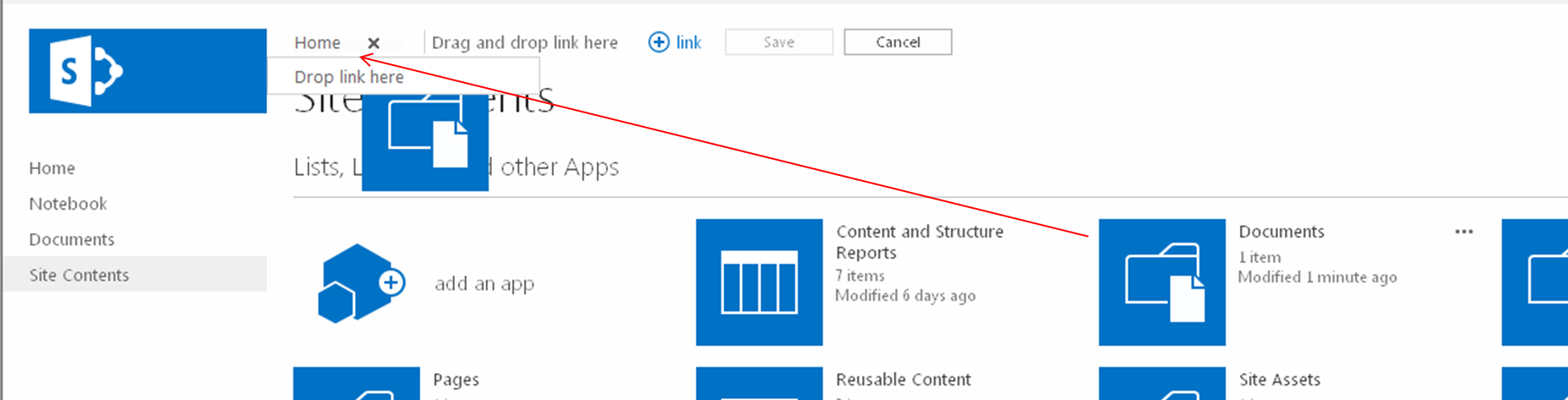
    1. In my example, I will add the “Documents” document library, so I went to the “Site Content” page
  3. You will see the “EDIT LINKS” link to the right of your global navigation, click the “EDIT LINKS” link (remember that you need to have full control on this site to see this link)
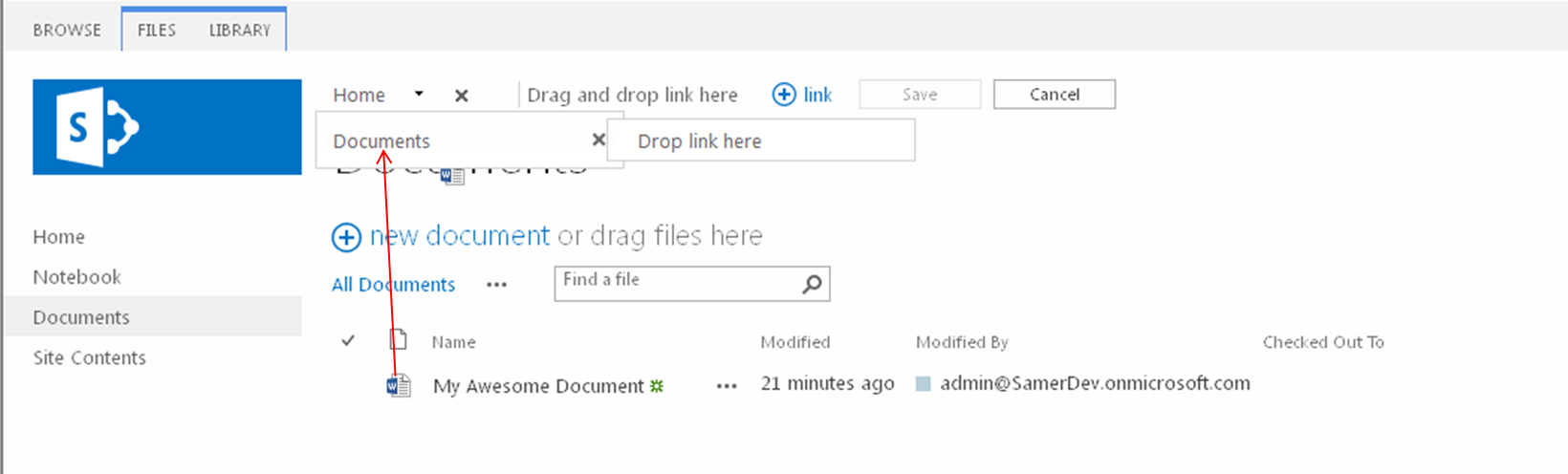
  4. You can add that item as a top level navigation item or as a child navigation item of an existing item
    1. To drop the item as a top level navigation item, drag and drop the item onto the “Drag and drop link here” text
    2. To drop the item as a child of an existing item, drag and drop the item onto the existing itemMetadataDrivenNavigation.Figure6
  5. Click the Save button
  6. Repeat steps 2-5 until you have added all the items you want in your navigation
    1. Items can be any draggable objects in your SharePoint sites, so this includes Apps (including lists and libraries) and items (this includes list items, documents, and even people)
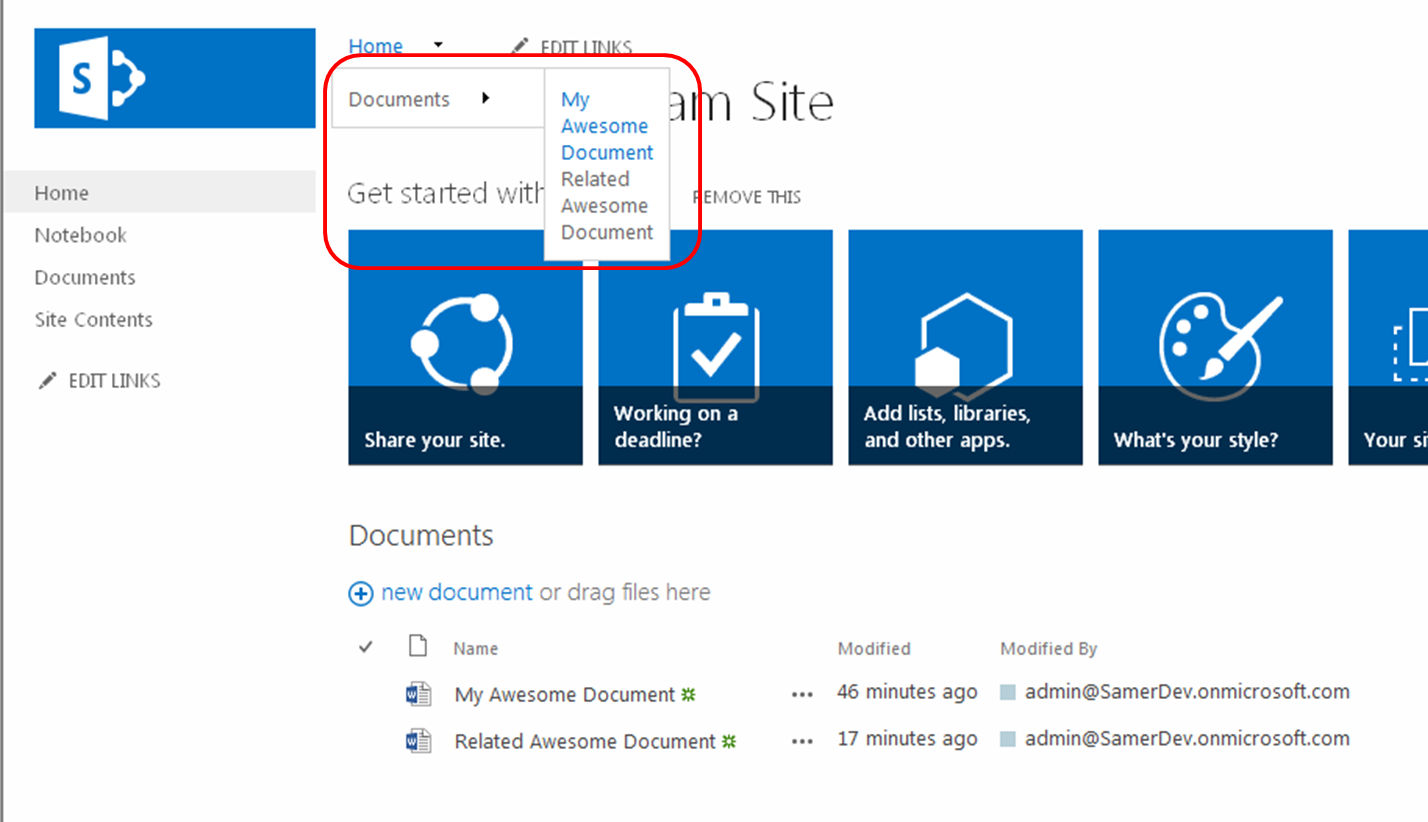
    2. For my example, I now opened the Document library and added the “My Awesome Document” under the Documents navigation itemMetadataDrivenNavigation.Figure7MetadataDrivenNavigation.Figure9
  7. Now if you go to the Term Store
    1. Site Actions > Site Settings
    2. Click Go to top level site settings [Site Collection Administration], if you are not on the root site collection
    3. Click Term store management [Site Administration]
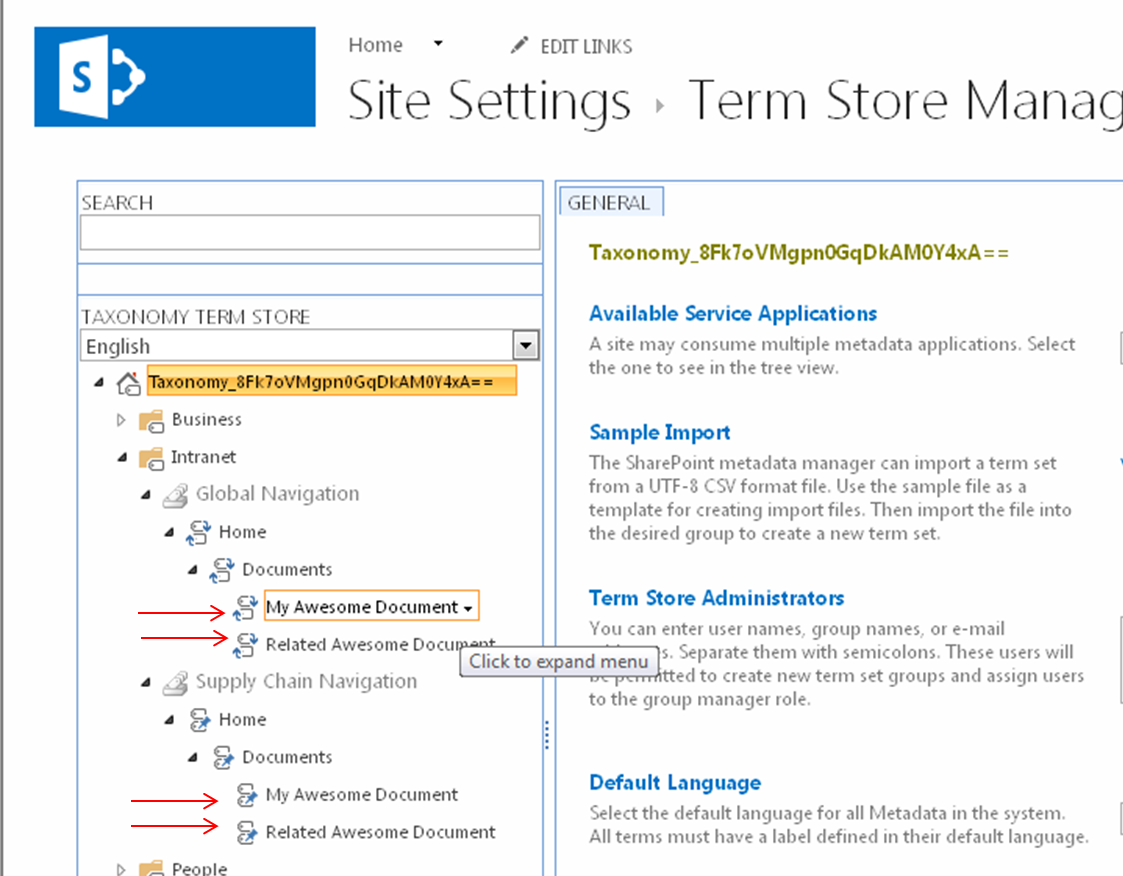
  8. Click on a Term Group that you are using for your global navigation (my example in the screen shots below is called “Intranet”)MetadataDrivenNavigation.Figure8
  9. As you can see, the navigation items that you have dragged and dropped are now terms under your global navigation Term Set.  In addition, you will notice that any pinned terms to the source term that you added now also have pinned sub terms.
  10. Also notice that in the Term Store you can add more children terms under the navigation terms that were added.  However anything beyond three levels will not show up in the global navigation, but can be used if you are intending to use this navigation Term Set for tagging content.
Posted in Managed Metadata, Navigation, SharePoint 2013 | Tagged Drag n Drop, Metadata, Navigation, Tagging, Term Store | Leave a reply

Post navigation

← Older posts
Newer posts →

Top Posts & Pages

  • Simplifying SharePoint 2013 REST API

Archives

  • November 2024
  • August 2020
  • December 2018
  • November 2018
  • March 2018
  • February 2018
  • January 2018
  • September 2017
  • March 2016
  • February 2015
  • January 2015
  • May 2014
  • February 2014
  • January 2014
  • November 2013
  • October 2013
  • August 2013
  • July 2013
  • June 2013
  • May 2013
  • April 2013
  • March 2013
  • February 2013
  • August 2012
  • May 2012
  • March 2012
  • February 2012

Tags

  • Absolute URLs
  • Administration
  • Authentication
  • BCS
  • callout.js
  • CallOuts
  • CCP
  • CEWP
  • Claims
  • Client Side Rendering (CSR)
  • Community Sites
  • Content Editor Web Part
  • Content Search Web Part
  • Cross-Site Collection Publishing
  • CRUD
  • CSOM
  • CSWP
  • DeltaSuite
  • Document Library
  • Drag n Drop
  • Dropbox
  • Entities
  • ErrorActionPreference
  • External Content Type
  • FAST
  • Fields
  • Guide
  • Guides
  • iCloud
  • Impersonation
  • InfoPath
  • Inheritance
  • Items Matching a Tag
  • JavaScript
  • Lab
  • List Items
  • mailbox
  • Managed Metadata Service
  • Metadata
  • Microsoft
  • models resources
  • Navigation
  • Office 365
  • Outlook
  • Permissions
  • Power BI
  • Preview
  • Product Catalog
  • Relative URLs
  • Reorganization
  • REST
  • Revert To Self
  • runtime errors
  • Search
  • Security
  • Security Trimming
  • service applications
  • SharePoint Designer
  • SharePoint Saturday
  • SharePoint Server Publishing Infrastructure
  • Site Templates
  • SkyDrive
  • software
  • SPS Philly
  • SQL Server
  • SSS
  • Tagging
  • Term Store
  • Training
  • Updates
  • Views
  • Visual Studio & TFS
  • Web Parts
  • Workflows
  • XML

Meta

  • Create account
  • Log in
  • Entries feed
  • Comments feed
  • WordPress.com
Blog at WordPress.com.
Samer 365
Blog at WordPress.com.
  • Subscribe Subscribed
    • Samer 365
    • Already have a WordPress.com account? Log in now.
    • Samer 365
    • Subscribe Subscribed
    • Sign up
    • Log in
    • Report this content
    • View site in Reader
    • Manage subscriptions
    • Collapse this bar
 

Loading Comments...